A Reel can look great and still go nowhere. Most of the time, the problem isn't the editing. It's that nothing in the script gave people a reason to keep watching, or a reason to send it to someone.
Instagram has been fairly open about what it pays attention to. So instead of guessing, you can write your Reels script around it.
Here's how to write an Instagram Reels script that holds attention and gets shared, with a structure, a template and examples you can copy.
What Instagram looks at
Adam Mosseri, the head of Instagram, said in early 2025 that the three signals that matter most for ranking are watch time, likes and sends. He suggested creators track average watch time, likes per reach and sends per reach.
He also said sends matter a bit more for reaching people who don't follow you yet. That makes sense. When someone sends your Reel to a friend in a DM, it's a strong sign the video is worth showing to more people.
Instagram's own creator advice has been simple for a while: post original content consistently. Creators of all sizes can reach new audiences, and Reels up to 3 minutes can be recommended to people who don't follow you.
So a good Reels script has three jobs:
- Hold attention so watch time stays high.
- Deliver something worth liking so people react.
- Give people a reason to send it to someone else.
Start with the "send" in mind
Before you write the hook, ask: who would someone send this to, and why?
People send Reels that:
- Describe a friend perfectly. "This is so you."
- Solve a problem someone they know has. "You need this for your trip."
- Make them laugh. Relatable moments and funny observations.
- Settle a debate. "See, I told you."
- Are useful to save and share. Recipes, tips, places, prices.
If you can't picture who your viewer would send the Reel to, the idea may be good for likes but weak for reach. That's fine sometimes. But for Reels you want to grow with, build the send into the idea.
Weak: "5 tips for better sleep."
Better: "If your partner says they 'can't sleep without the TV on', send them this."
The second one has the same tips inside. It just tells people exactly who to send it to.
Write a hook for both sound and silence
Plenty of people scroll Reels with the sound off. Your hook needs to work either way:
- Say it in the first second.
- Put it on screen as short text in the first frame.
- Show it if you can, so the picture matches the words.
Keep the spoken hook under about 12 words. Lead with the interesting part: a result, a mistake, a surprise or a call-out to a specific person. Our 50 video hook examples have plenty of shapes to borrow.
A simple Reels script structure
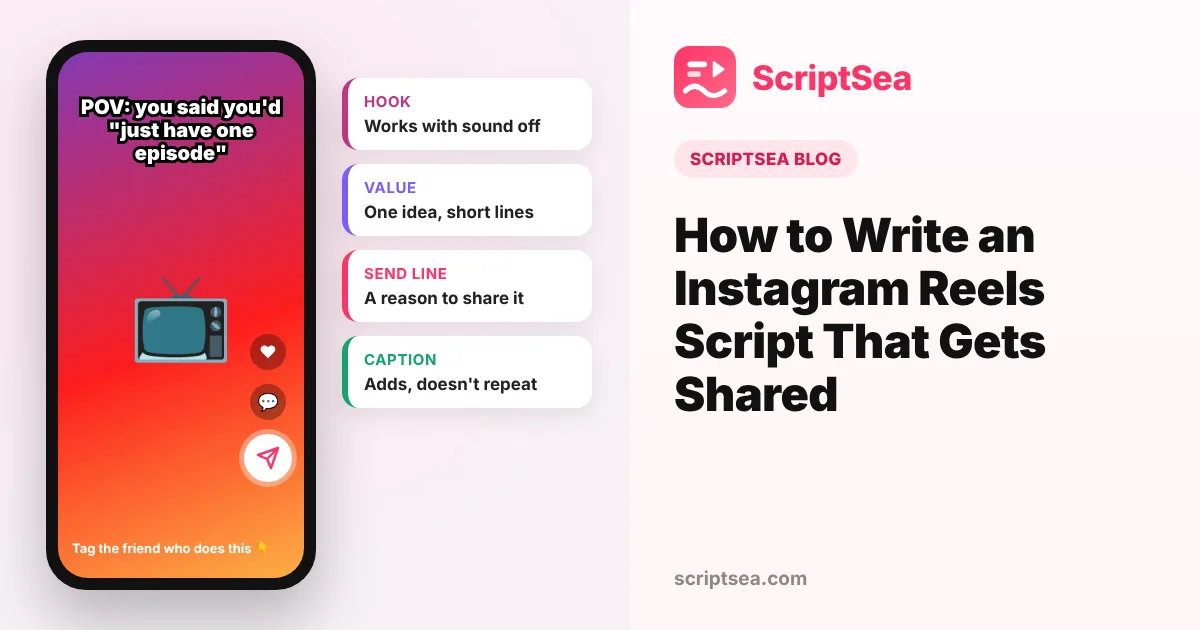
Most Reels that hold attention follow four beats:
| Beat | Time (30s Reel) | Job |
|---|---|---|
| Hook | 0 to 2s | Stop the scroll, sound on or off |
| Setup | 2 to 6s | One line of context, only if needed |
| Value | 6 to 25s | The tip, story, list or reveal, in short lines |
| Send line or loop | 25 to 30s | A reason to share, or a line that loops to the start |
The last beat is where a lot of Reels waste their chance. "Follow for more" is weak. A line that gives the viewer a reason to share, or a loop that makes the Reel replay smoothly, does more for you.
How long should a Reel be?
Reels can now run up to 3 minutes, and longer Reels can be recommended. But longer only works if the content holds up.
A good rule: make the Reel as long as the idea needs and not a second longer. Quick tips and relatable moments often work best at 10 to 30 seconds. Tutorials, stories and breakdowns can earn 45 seconds to 2 minutes.
At a natural speaking pace, plan on roughly:
- 15 seconds: about 35 words
- 30 seconds: about 75 words
- 60 seconds: about 150 words
- 90 seconds: about 225 words
If you go past a minute, add a re-hook every 15 to 20 seconds, like "and this next one surprised me", so people have a reason to stay.
Write the on-screen text and caption too
Your script isn't just what you say. Plan three layers:
- Spoken lines. Short, natural, one thought per line.
- On-screen text. The hook in the first frame, then key words or numbers as you go. Keep it short and clear of the edges, where the buttons and caption sit.
- The caption. A first line that adds to the video instead of repeating it, plus a reason to comment or share. Put the most important words first, since only the start shows before "more".
Caption: "Saving this for my next trip to Lisbon. Who are you taking? 👇"
Two full Reels script examples
Example 1: relatable (about 20 seconds)
On screen: "POV: you said you'd 'just have one episode'"
"It's 9pm. One episode. That's it.
It's 10pm. Okay, one more, because it ended on a cliffhanger.
It's 1am. You're reading the episode summaries so you know what happens next.
It's 7am. Your alarm goes off, and you're genuinely angry at the show."
Caption: "Tag the friend who does this every single time."
This one is built for sends. Everyone knows someone who does this, and the caption tells them exactly what to do.
Example 2: useful (about 35 seconds)
On screen: "3 free apps I use every single day"
"Three free apps on my phone I use every day, and nobody talks about them.
One. A habit tracker that just shows a grid. Tick the box, keep the streak. That's it.
Two. A white noise app with a timer, so it turns off after I fall asleep.
Three. And this is the one I'd keep if I could only keep one: a budget app that sorts my spending automatically.
Send this to the friend who always asks how you stay organised."
The third item is held back as the best, which keeps people watching. The last line turns a tip into a share.
Common Reels script mistakes
- A slow open. Greetings and "so today" before the point.
- No on-screen hook. Muted viewers don't know why to stay.
- Trying to cover too much. One idea per Reel. Save the rest for the next one.
- Reposting other people's content. Instagram has made clear that original content is what it wants to recommend.
- A dead ending. "Thanks for watching" or "follow for more" instead of a send line or loop.
- A caption that repeats the video. Use it to add something or ask something.
Get a Reels script in seconds
Our free Instagram Reels Script Generator writes a hook-first Reels script timed to the length you pick, with on-screen text and a caption. If you post the same idea on YouTube too, here's how to write a YouTube Shorts script.
Try ScriptSea free
ScriptSea writes scripts for Reels, TikTok, Shorts and YouTube, timed to your length, plus AI video prompts for every scene if you make videos with AI. Try ScriptSea free. You get 3 free scripts, no card needed.