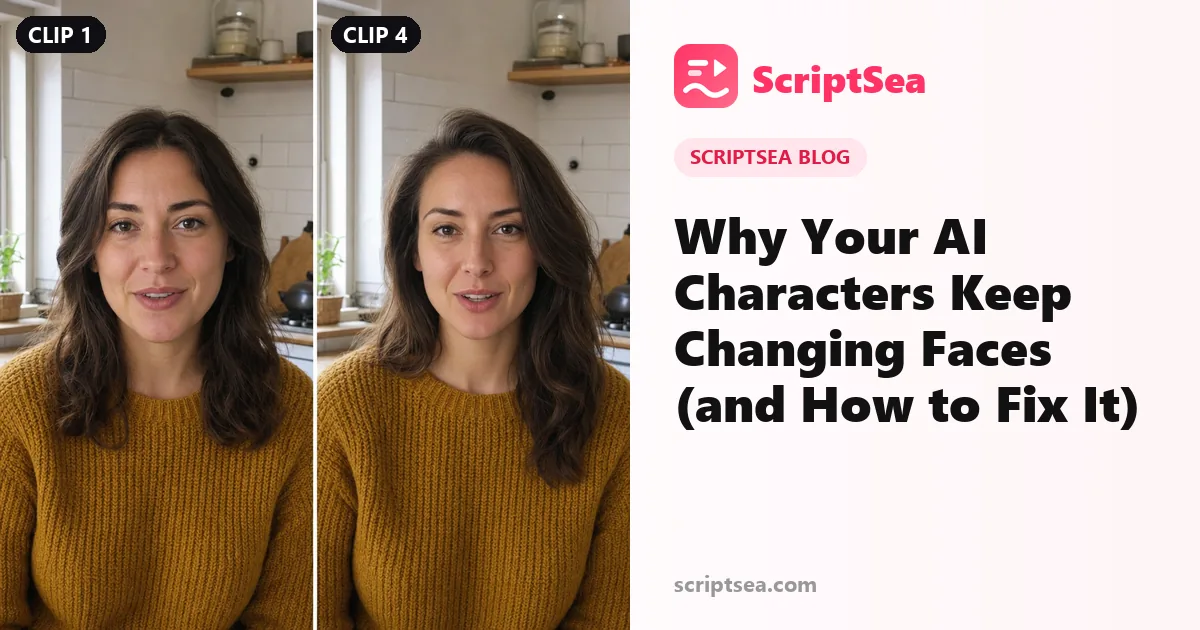
You've seen it happen. Clip 1 is perfect. The woman looks real, the light is great, she's exactly who you pictured. By clip 4 she has a different nose, a new jawline and somebody else's eyes.
It's not you. It's how these models work. They don't know clip 4 is meant to be the same person as clip 1. Not unless you make it very hard for them to get it wrong.
The good news is you can fix most of it. Not every time, and not perfectly. But well enough that the people watching won't notice. Here's what's going on, and what actually works.
Why it happens
Every clip is generated fresh. The model starts from scratch and builds a new video from your prompt and any images you give it. It has no memory of the last clip. It doesn't even know there was a last clip.
So when you write "a woman in her thirties with dark hair", the model picks one of millions of women who fit. Next clip, it picks again. You get someone new.
Every vague word in your prompt is a chance for the model to change something. "Casual clothes" can be a hoodie in one clip and a denim jacket in the next. "Nice lighting" can be golden hour, then a cold office. Each small change pulls the face a little further from where it started.
Longer videos make it worse. A 60-second video built from 3-second clips is 20 separate generations. That's 20 chances to drift.
Reference images help a lot, but they're not magic either. The model still has to guess anything the image doesn't show, like her profile or how she smiles. The fixes below shrink how much it has to guess.
The 7 fixes that actually work
1. Make the character once, then tag the image
Create your character as one reference image first. A clear, front-facing shot in even light works best. Then attach that image to every clip and refer to it by its tag.
Don't re-describe the person in text. A new description gives you a new person, even if you copy it carefully. Let the image carry the face.
If your tool doesn't support tags, use the same image as the start frame of every clip instead.
Example: "@Maya walks into the kitchen and puts her keys on the counter." Not: "A 32-year-old woman with curly brown hair and freckles walks into the kitchen."
2. Pick one outfit and write it the same way every time
Choose the outfit once. Then paste the exact same words into every prompt. Not similar words. The same words, in the same order.
Example: "a mustard knit sweater, dark blue straight jeans, white canvas sneakers"
If clip 3 says "yellow jumper" instead, the model reads that as a new outfit. And a new outfit often brings a slightly new face with it.
3. Make the empty scene first
Generate the location with nobody in it. Save that image. Then give the model two separate references: the character and the scene.
Example: make "a small kitchen with white tiles, a wooden counter and a window on the left" as its own image. Then tag @Maya and @Kitchen in every clip.
When the model doesn't have to invent the room, it has fewer things to get wrong. The face stays steadier. It also stops the room from changing, so the window doesn't jump to the other wall.
4. Keep the lighting line identical
Light changes a face more than you'd think. Shadows move the jawline. Warm light shifts the skin tone. Side light changes the shape of the nose.
Write one lighting line and use it in every prompt, word for word.
Example: "soft daylight from a window on her left, warm and even, no harsh shadows"
If the story moves outside, write a new line once. Then repeat that one from there on.
5. Use fewer, longer clips
Every generation is a new roll of the dice. Ten 3-second clips means ten rolls. Three 10-second clips means three.
Most current models handle 8 to 10 seconds well, so use it. Plan each clip to cover a full moment, not a single beat. You'll get fewer drifts and a smoother video.
Example: for a 36-second ad, don't make 12 clips of 3 seconds. Make 4 clips of 9 seconds: the hook, the problem, the product, the result.
6. With two characters, say who speaks every time
Two people in one scene is where things fall apart. Faces swap. Voices swap. The wrong mouth moves.
In every clip, name who is speaking. Then describe their voice the same way each time.
Example: "The woman on the left says, in a calm, low voice: 'We should have left an hour ago.' The man on the right stays silent and looks at the door."
Keep each voice description fixed. If one clip says "deep voice" and the next says "gravelly voice", you might hear two different men.
It also helps to keep them on the same side of the frame. Left stays left, right stays right, in every clip.
7. Ask for no captions
Lots of video models add captions or random text when someone talks. It looks messy, and the words are often misspelled.
Add this line to every prompt with speech:
"No captions, no subtitles, no on-screen text."
It won't work 100% of the time. But it cuts the problem down a lot.
Good prompt vs bad prompt
Here's the same scene written two ways. The vague version isn't wrong. It just leaves too much for the model to guess.
| Vague (changes every clip) | Fixed (stays the same) | |
|---|---|---|
| Outfit | "casual clothes" | "a mustard knit sweater, dark blue straight jeans, white canvas sneakers" |
| Lighting | "nice lighting" | "soft daylight from a window on her left, warm and even, no harsh shadows" |
| Who speaks | "they talk about the trip" | "The woman on the left says, in a calm, low voice: 'We should have left an hour ago.'" |
The fixed lines are longer. That's the point. Every detail you pin down is one less thing the model can change.
Keep your fixed lines in a note before you start. Then paste them, don't retype them. Retyping is where small changes sneak in.
Which models hold a face best
Honestly, it depends. Results vary between models, and they shift every time a model updates. A model that held faces well last month might drift more after a new release, or the other way round.
What matters more is the reference image. A clear reference image on an average model beats a perfect text description on the best one. Most of the big models now accept reference images in some form, including Seedance, Veo, Kling and Gemini Omni Flash.
If you use one of those, our free prompt generators write prompts the way each model reads them best: Seedance, Veo, Kling and Omni Flash.
Whatever you use, test it first. Make your character in three short clips and compare them side by side. It takes ten minutes and saves you a whole video of drift.
Let a tool do the boring part
Copying the same character and outfit lines into every scene by hand gets old fast. Our Script to AI Video Prompts tool splits your script into scenes and writes the same character and outfit details into every prompt for you.